 TaleArt docs
Install with Docker
One docker compose up runs the whole install: the database, the API, the dashboard and a small proxy that gives them one address. Use it to try TaleArt on your machine in a few minutes, or to run it on a server with automatic https. For running from source without Docker, see Install TaleArt locally.
What you get
Compose starts four services. Only the proxy publishes ports; the others are reachable inside the compose network.
| Service | What it is | Ports |
|---|---|---|
db | PostgreSQL 16. Holds all the data. | None published |
api | The TaleArt API: management, delivery, media and the Web SDK files. | 3333, inside the network |
dashboard | The dashboard (server-rendered Angular). | 4000, inside the network |
proxy | Caddy. One address for everything, and the https certificate. | 80 and 443 on the host (8080 and 8443 in the quick try) |
The proxy gives the dashboard and the API one origin, which passkeys and the session cookie need. It routes by path:
| Path | Goes to |
|---|---|
/api/*, /delivery/*, /media/*, /sdk/* | api |
| Everything else | dashboard |
Five named volumes keep the data across restarts and upgrades:
| Volume | Holds |
|---|---|
taleart_db-data | The PostgreSQL data. |
taleart_media | Uploaded media files (/data/media in the api). |
taleart_sdk-builds | Earlier Web SDK builds, so pages that pin them keep working. |
taleart_caddy-data | The https certificates. Keep it, or Let's Encrypt limits may bite when they are issued again. |
taleart_caddy-config | The proxy's own configuration state. |
Requirements
- Docker Engine 24 or later with the Compose plugin (v2.24 or later).
- 2 GB of RAM free for running it, and about 6 GB of disk during the first build.
- The images are built from source on the machine that runs compose, for its own architecture (amd64 or arm64). The first build takes about two minutes; later ones reuse the cache.
- The repository, cloned with
git.
Quick try on localhost
Nothing to configure. This uses the placeholder values in .env.docker.example and serves TaleArt on port 8080.
git clone <this repository> taleart && cd taleart
docker compose --env-file .env.docker.example up -d --build
Open http://localhost:8080. The setup screen allows a username and password, as well as a passkey.
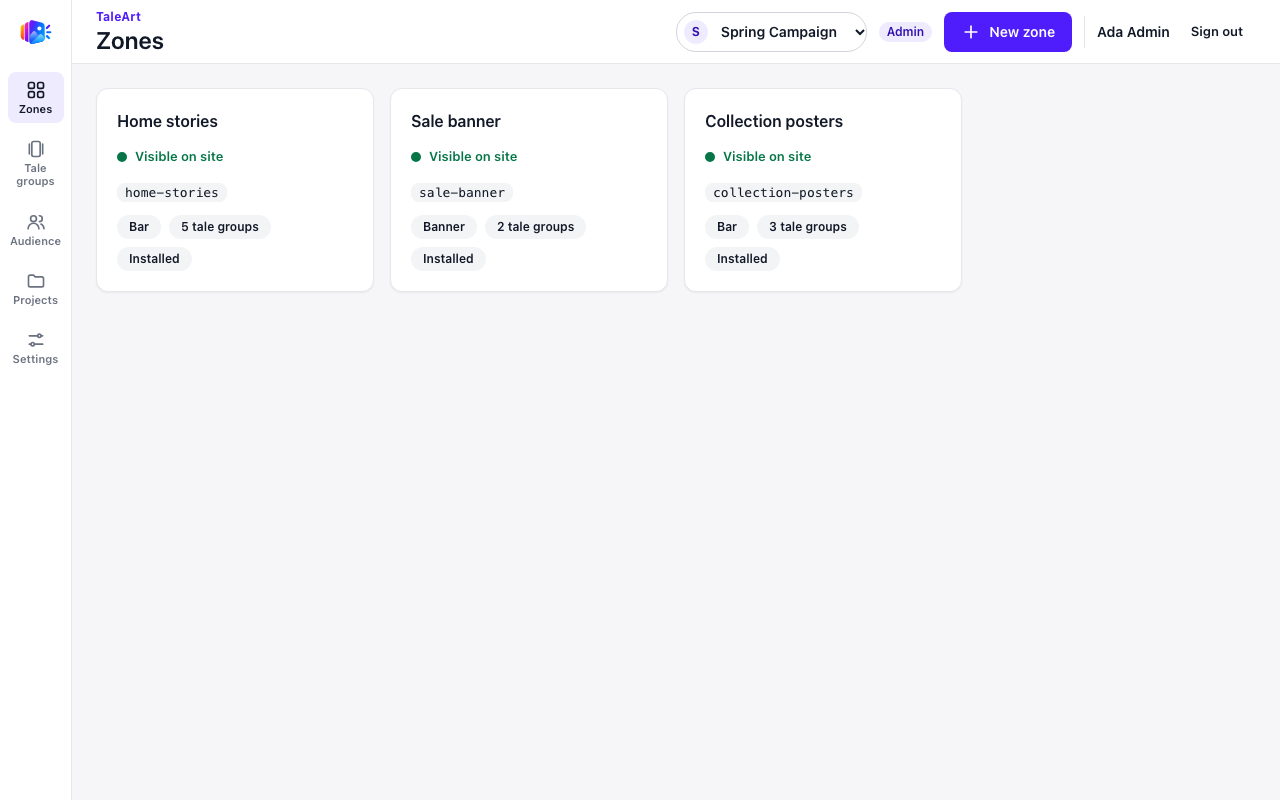
The quick try also fills the install with demo data: TALEART_SEED_DEMO=true is on in .env.docker.example, so a few seconds after the first admin finishes setup there is a ready project, with zones, tale groups, tales and a small team. Set it to false on a real install.
Warning: the database password, the secret key and the setup password in that file are public values, printed in the repository. Use them only on your own machine, never on a server.
A real install on a domain
This gives you a public address with an https certificate that the proxy gets and renews by itself.
Point a name at the server.
Create a DNS A (and AAAA) record for the name, such astaleart.example.com, that points at the host. The DNS must be correct before the first start, and ports 80 and 443 must be open: the certificate is requested over them.Copy the example file.
Clone the repository and copy.env.docker.exampleto.env.git clone <this repository> taleart && cd taleart cp .env.docker.example .envSet the address and the ports.
In.envsetTALEART_URL=https://taleart.example.com, with no trailing slash, and use the real ports:TALEART_HTTP_PORT=80andTALEART_HTTPS_PORT=443.Generate the secrets.
Replace the two placeholders with random values and keep a copy of them.
Put the first output inopenssl rand -hex 24 # POSTGRES_PASSWORD openssl rand -base64 32 # TALEART_SECRET_KEYPOSTGRES_PASSWORDand the second inTALEART_SECRET_KEY. LeaveTALEART_SETUP_PASSWORD=false(the default) so the first admin must use a passkey.Start it.
Build and start the stack, then check that all four services are healthy.
Opendocker compose up -d --build docker compose ps # db, api, dashboard and proxy should be "healthy"https://taleart.example.com.
Do not skip the secrets. POSTGRES_PASSWORD has no default: compose refuses to start while it is empty. Changing it later does not change the existing database, so set it before the first start.
Environment variables
Set these in .env, next to docker-compose.yml. The file .env.docker.example lists all of them.
| Variable | Required | Default | Meaning |
|---|---|---|---|
TALEART_URL | Yes | None (the example file sets http://localhost:8080) | The exact address people open, with no trailing slash. The passkey domain and origin, the public media and SDK URL and the host the dashboard accepts all come from it. https:// turns on automatic certificates; http:// serves plain HTTP. |
TALEART_HTTP_PORT | No | 80 (the example file sets 8080) | Host port of the proxy for http. |
TALEART_HTTPS_PORT | No | 443 (the example file sets 8443) | Host port of the proxy for https. |
POSTGRES_PASSWORD | Yes | None | Password of the taleart database user. Letters and digits are safest, because it goes into a connection URL. Only set it before the first start. |
TALEART_SECRET_KEY | Recommended | Empty | 32 random bytes, base64. Encrypts the sign-in provider secrets (Google, Apple, OIDC) stored in the database. Keep it: if it is lost, the saved secrets cannot be read. Left empty, the API runs but refuses to save provider secrets. |
TALEART_SETUP_PASSWORD | No | false (the example file sets true) | true lets the first admin set up with a username and password instead of a passkey. |
TALEART_SEED_DEMO | No | false (the example file sets true) | true makes the demo project for the first admin right after setup. Quick try only; once, and only on an install with no other user. |
TALEART_VERSION | No | local | local builds the images here. latest or a version such as 0.1.0 pulls lempert/taleart-api and lempert/taleart-dashboard from Docker Hub (run docker compose pull first). |
TRUST_PROXY | No | 1 | How many proxies in front of the API are trusted for X-Forwarded-For: a number of hops, or a list of addresses. 1 is the bundled proxy; 2 when your own proxy sits in front of it. Used for the per-visitor rate limit. |
DELIVERY_RATE_LIMIT_BURST | No | Empty (built-in default) | Delivery API requests a visitor may make at once. 0 turns the limit off. |
DELIVERY_RATE_LIMIT_PER_SECOND | No | Empty (built-in default) | Delivery API requests per second per visitor. |
DATABASE_POOL_MAX | No | 20 | Database connections the API holds. |
SDK_BUILDS_KEPT | No | 5 | How many Web SDK builds stay at their pinned URLs (2 to 100). |
TALEART_API_PORT | No | 3333 | Only with the external-proxy file: the loopback port of the api. |
TALEART_DASHBOARD_PORT | No | 4000 | Only with the external-proxy file: the loopback port of the dashboard. |
The API also reads PROJECT_MEDIA_MAX_FILES, PROJECT_MEDIA_MAX_BYTES, RP_ID, RP_ORIGIN and PUBLIC_API_URL. The last three are derived from TALEART_URL; set them in docker-compose.yml under api only to override.
First run
The first visit shows the setup screen. Enter a name, an email and the name of your first project, then create the administrator. Setup is open only until the first admin exists.
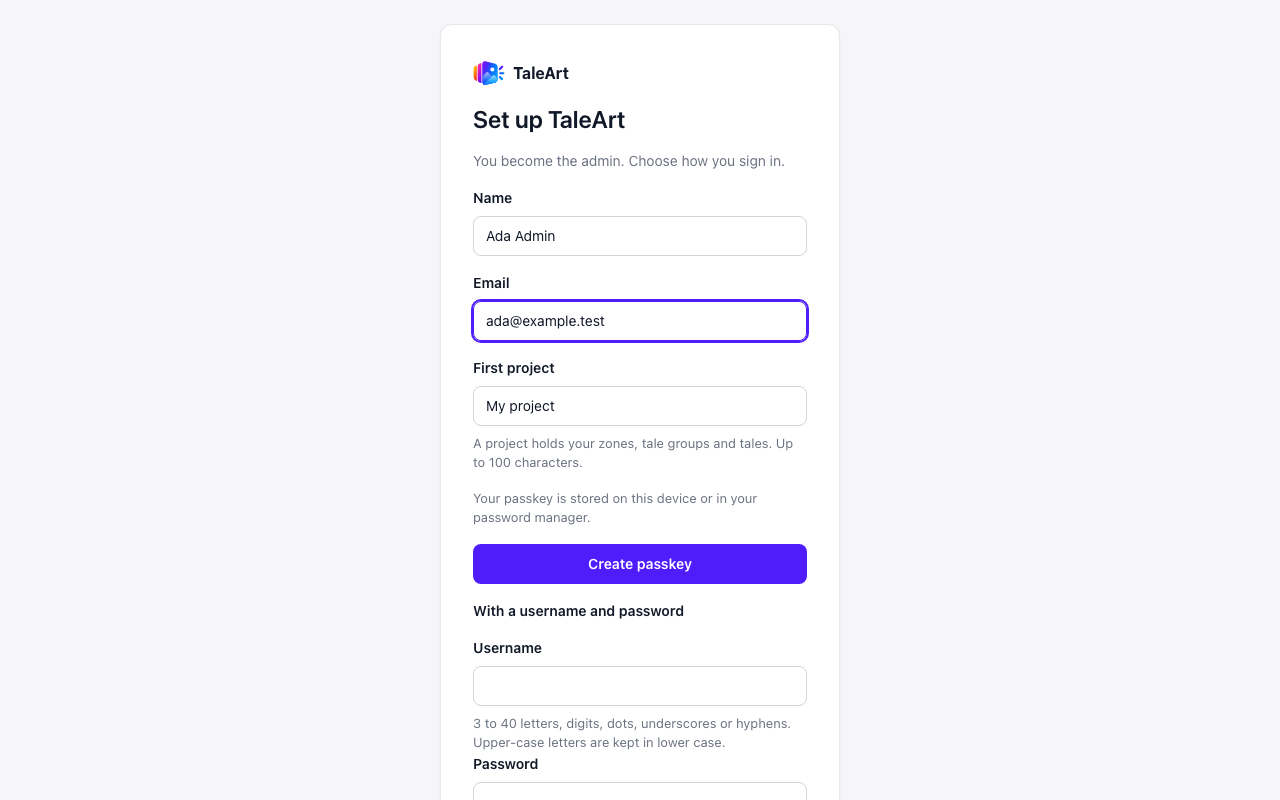
TALEART_SETUP_PASSWORD=true.- Passkey. Choose Create passkey. Browsers register passkeys only on
https://addresses and onhttp://localhost. Anhttp://address such ashttp://192.168.1.20cannot register a passkey: use a real domain with https, or localhost. - Username and password. Set
TALEART_SETUP_PASSWORD=truein.envand restart the api to offer this on the setup screen. It is off by default; turn it on only if you cannot use a passkey, and consider turning it off after setup. - The domain is fixed. The passkey is bound to the domain in
TALEART_URL. Changing the domain later makes existing passkeys unusable.
After setup you land on the Zones page of your first project. In the quick try, the demo data appears a few seconds later.
Next: Getting started walks through the first zone, and Install a zone shows the snippet.
Behind your own reverse proxy
If you already run a reverse proxy on the host, do not publish the bundled one. The overlay file deploy/docker-compose.external-proxy.yml turns the bundled proxy off and publishes the api and the dashboard on loopback only, at 127.0.0.1:3333 and 127.0.0.1:4000.
docker compose -f docker-compose.yml -f deploy/docker-compose.external-proxy.yml up -d --build Set TALEART_URL to the address your proxy serves. Your proxy must route /api/, /delivery/, /media/ and /sdk/ to port 3333 and everything else to port 4000, keep the original Host header, send X-Forwarded-For, and allow bodies of at least 100 MB and requests of 300 seconds. An nginx server block:
server {
  server_name taleart.example.com;                # listen 443 ssl; certificates as usual
  client_max_body_size 110m;
  proxy_read_timeout 300s;
  proxy_set_header Host $host;
  proxy_set_header X-Forwarded-For $remote_addr;  # one trusted hop: TRUST_PROXY=1
  proxy_set_header X-Forwarded-Proto $scheme;
  location ~ ^/(api|delivery|media|sdk)/ { proxy_pass http://127.0.0.1:3333; }
  location / { proxy_pass http://127.0.0.1:4000; }
}
If another proxy, such as a CDN or a load balancer, sits in front of yours, use $proxy_add_x_forwarded_for and set TRUST_PROXY=2.
Data and backups
Everything lives in the volumes listed above. Back up the database and the media files, and keep .env with them: the secret key in it is needed to read the saved provider secrets.
# database
docker compose exec -T db pg_dump -U taleart -Fc taleart > taleart-$(date +%F).dump
# media files
docker run --rm -v taleart_media:/data -v "$PWD":/backup alpine tar czf /backup/media-$(date +%F).tgz -C /data .
# restore the database into an empty install
docker compose exec -T db pg_restore -U taleart -d taleart --clean --if-exists < taleart-2026-01-01.dump
The taleart_sdk-builds volume holds earlier Web SDK builds so pages that pin one keep working; include it in your volume backups if you rely on pinned builds. To restore, bring up an empty install and run the pg_restore command.
Upgrades
git pull
docker compose up -d --build
The API applies database migrations itself when it starts. They only go forward: there is no automatic way back to an older version, so take a database backup before every upgrade.
Logs and health
docker compose logs -f api            # structured JSON, one line per entry
docker compose logs -f proxy dashboard
docker compose ps
docker compose ps should show db, api, dashboard and proxy as healthy. The proxy starts only after the api and the dashboard are healthy. API logs are structured JSON, one line per entry.
Stopping and resetting
docker compose down       # stops; data stays in the volumes
docker compose down -v    # stops AND DELETES the database, media and certificates
docker compose down -v deletes everything, including the administrator, so setup starts again. To reset only the setup, restore a database backup instead. If you changed POSTGRES_PASSWORD after the first start, change the user's password in the database to match: ALTER USER taleart PASSWORD '...' in docker compose exec db psql -U taleart.
Troubleshooting
| What you see | Why | What to do |
|---|---|---|
Compose says a port is already in use, or proxy does not start | Another program uses port 80, 443, 8080 or 8443 on the host. | Stop it, or set TALEART_HTTP_PORT and TALEART_HTTPS_PORT to free ports and start again. On a server with a domain, 80 and 443 must be free. |
Compose refuses to start: Set POSTGRES_PASSWORD in .env or Set TALEART_URL in .env | A required variable is empty, or there is no .env file. | Copy .env.docker.example to .env and fill in both values. |
| The setup page does not load, or the dashboard answers with 400 | The dashboard accepts only the host name in TALEART_URL. You opened the stack by another name or address. | Open exactly the address in TALEART_URL, or correct it in .env and run docker compose up -d again. |
| The browser refuses to create a passkey | The address is plain http:// on a name other than localhost. | Use https on a real domain, or localhost. With TALEART_SETUP_PASSWORD=true the first admin can use a password. |
| No https certificate, or the browser warns about the certificate | The DNS record does not point at the host, or ports 80 and 443 are not reachable from outside. | Fix the DNS record and the firewall, then check docker compose logs -f proxy. |
The api log says Provider secrets off: TALEART_SECRET_KEY is not set | The secret key is empty (or, with a different message, is not 32 bytes of base64). | Set it with openssl rand -base64 32. Until then the API runs but cannot save sign-in provider secrets. |
The api cannot connect to the database after you changed POSTGRES_PASSWORD | The password only applies when the database is first created. | Restore the old value, or change the user's password inside the database (see Stopping and resetting). |
Security notes
- The database publishes no port. It is reachable only from the other services in the compose network.
- Only the proxy is published, or, with the external-proxy file, the api and the dashboard on
127.0.0.1only. - The api and the dashboard containers run as a non-root user.
- Replace every placeholder secret from
.env.docker.examplebefore a server is reachable from the internet, and keep.envout of version control. - Keep
TALEART_SETUP_PASSWORDoff on a server unless you need it.