 TaleArt docs
Targeting
A tale group can show to some viewers only: by targeting tags, by user lists, by viewer properties (an audience rule), or several of them. You set them in the group's Audience (its ⋯ menu); a group with none of them shows to everyone.
Targeting tags
A group's tags combine with Any (the default: one of them is enough) or All. The page tells the SDK the viewer's tags, and the SDK decides in the browser: tags are never sent to TaleArt. A page that passes no tags shows every group, tagged or not.
<script type="module">
  import { setTags } from 'https://api.example.com/sdk/v1/taleart.js';

  setTags(['summer', 'vip']);
</script>
User lists and the external user ID
A user list holds your site's own IDs for its users, uploaded on the Audience page as a CSV with one ID per row. A group targeted to user lists shows only to a viewer whose external user ID is in one of them, and whose tags also pass the group's tag rule. A viewer with no ID, or one in none of its lists, does not get the group at all: the Delivery API leaves it out of the response.
Tell the SDK who the viewer is once for the page, for example after sign-in:
<script type="module">
  import { setExternalUserId } from 'https://api.example.com/sdk/v1/taleart.js';

  // Your own opaque ID for the signed-in user; null after sign-out.
  setExternalUserId('cust-1001');
</script>- Use an opaque ID from your own system, never an email address or a phone number. The ID is trimmed and matched exactly: case counts, and any Unicode text works.
- The SDK sends it to the Delivery API in the
X-TaleArt-External-User-Idrequest header, as base64url of its UTF-8 bytes, and never in a URL. It keeps the ID in memory only: not in storage or a cookie. - Every zone on the page loads again with the new ID.
setExternalUserId(null)sends none again. - A group targeted only to user lists that hold no ID reads Not visible: its user lists are empty in the dashboard, and nobody sees it until a list has an ID.
Viewer properties and audience rules
A viewer property is a fact your site already knows about the viewer: a plan, an age, a tier, a list of interests. An audience rule on a tale group compares those properties, and the group shows only to viewers whose properties pass it. Set the properties on the page with the Web SDK or in the native SDK, and the rule in the group's Audience. Both are checked on the device, never on the server.
Properties or tags?
| When | Use | Why |
|---|---|---|
The viewer belongs to a named group you label, such as vip or summer | Tags | One label per segment, set with setTags. A group's tags combine with Any or All. |
| You compare a value: a plan, a number at least 30, a tier in a list, a date before a cut-off | Viewer properties (audience rule) | Typed values and operators. One rule per group, on top of its tags. |
| The viewer is one of your known users, by your own ID | User lists | Matched on the server by the external user ID. The list is stored as hashes only. |
| Several of the above | Combine them | A group shows only when its tags, its audience rule and its user lists all pass. |
Property types and limits
- Names: 1 to 64 characters, starting with a letter, then letters, digits,
_,.or-. Names are case-sensitive:Planandplandiffer. - Values: text (up to 256 characters), a number, a boolean (
trueorfalse), or a list of text values (up to 50 items). - Up to 50 properties per page. Dates are passed as epoch milliseconds (a number), then compared with
gt,ltand the others. - An invalid entry is dropped, and the Web SDK logs one console warning that names it. The native SDKs ignore it.
- An audience rule has match
all(every condition must pass) orany(one is enough), and 1 to 10 conditions. Conditions do not nest.
Operators
| Operator (dashboard label) | Meaning | Value |
|---|---|---|
eq (is) | The viewer's value equals the value | Text, number or boolean |
neq (is not) | The viewer's value differs from the value | Text, number or boolean |
in (is one of) | The viewer's value is one of the listed values | A list |
notIn (is not one of) | The viewer's value is none of the listed values | A list |
gt (is more than) | Greater than | A number |
gte (is at least) | Greater than or equal to | A number |
lt (is less than) | Less than | A number |
lte (is at most) | Less than or equal to | A number |
contains | Text contains the text, or a list contains the item | Text |
exists (is set) | The property is set | None |
notExists (is not set) | The property is not set | None |
How a viewer is checked
| Situation | Result |
|---|---|
| The group has no audience rule, or an empty one | Passes |
The page passes no properties (never set, or setProperties(null)) | Every rule passes, so the page behaves as before the feature |
| The page passes properties, even an empty object | Each condition is checked |
| The property is missing | The condition is false, except neq, notIn and notExists, which are true |
The value has another type (gt on text, a number compared with text) | The condition is false |
Text is compared with eq, in or contains | Ignoring case and surrounding spaces. Numbers and booleans compare exactly. |
| The group has tags, an audience rule and user lists | All three must pass |
Three examples
Pro members
The group shows to viewers on the pro plan. The rule is saved in the group's Audience:
{
  "match": "all",
  "conditions": [
    {
      "property": "plan",
      "operator": "eq",
      "value": "pro"
    }
  ]
}
The page tells the SDK the viewer's properties, after sign-in:
<script type="module">
  import { setProperties } from 'https://api.example.com/sdk/v1/taleart.js';
  setProperties({ plan: 'pro' });
</script>
Pro members aged 30 and over
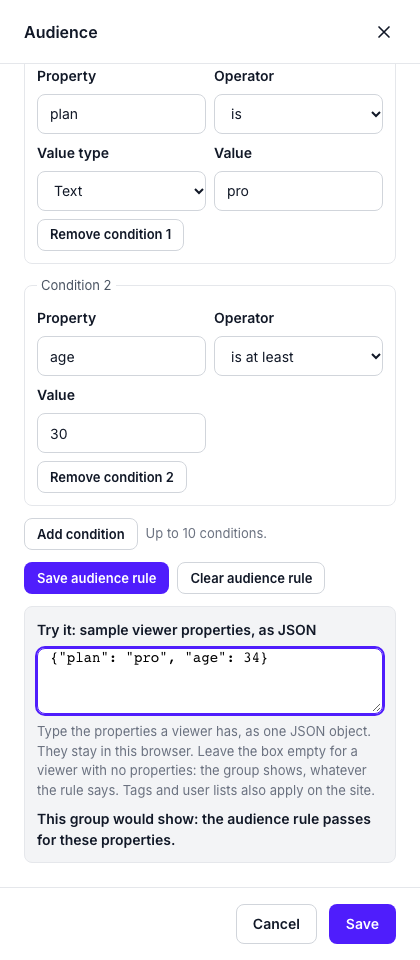
Two conditions, both must pass. The dashboard shows the rule as for viewers where plan is pro and age is at least 30.
{
  "match": "all",
  "conditions": [
    {
      "property": "plan",
      "operator": "eq",
      "value": "pro"
    },
    {
      "property": "age",
      "operator": "gte",
      "value": 30
    }
  ]
}
<script type="module">
import { setProperties } from 'https://api.example.com/sdk/v1/taleart.js';
setProperties({ plan: 'pro', age: 34 });
</script>Gold or platinum, or many points
Either condition is enough: a tier in a list, or a number of points at least 5000.
{
  "match": "any",
  "conditions": [
    {
      "property": "tier",
      "operator": "in",
      "value": [
        "gold",
        "platinum"
      ]
    },
    {
      "property": "points",
      "operator": "gte",
      "value": 5000
    }
  ]
}
<script type="module">
import { setProperties } from 'https://api.example.com/sdk/v1/taleart.js';
setProperties({ tier: 'gold', points: 6200 });
</script>The audience rule in the dashboard
Open Tale groups, then the group's ⋯ menu, then Audience. The Audience rule holds one row per condition: a property, an operator and a value, and Add condition for another. Try it takes the properties a sample viewer has, as JSON, and says whether the group would show to that viewer. The group's row keeps the rule in its visibility line.

Bars and banners
A rule applies to bars and banners alike. A banner's slides are tale groups, so each slide is shown or left out by its own rule, and a banner with no slide left for a viewer shows nothing. The same zone can therefore show a free viewer one group and a pro viewer another, in either form. The Web guide has the real screenshots.
Privacy
- The rule is public. It is delivered with the zone to every viewer, as tag names are. Keep private content out of rule values: use an opaque segment, such as
tierset togold, never an email address, a health or a financial fact. - The viewer's properties are never sent to TaleArt. The rule is checked in the browser or the app, against the properties the page holds. No request, header or analytics field carries them, and TaleArt does not store them.
- Targeting is not access control, as for tags: the tales of a group are public media, and anyone with a zone key can see which groups come back for the properties they try.
What TaleArt stores, and how to delete it
- User lists: each ID only as a keyed hash (HMAC-SHA-256) under a random secret of the project, never in clear. The dashboard shows how many IDs a list holds, never which, and cannot export them. The CSV is read as it arrives and not kept.
- The project's secret, created with its first list and deleted with its last.
- Which groups use which lists. Deleting a list deletes it and all its hashes at once, for good, and removes it from every group. A group targeted only to that list does not turn public: it reads Not visible: its user lists were removed and shows to nobody until someone changes its Audience. A copy to another project leaves its lists behind and is held the same way.
- Nothing about the viewer: the Delivery API hashes the ID for the lookup and drops it. It is not logged, stored or linked to the device's visitor id. A response to a request with the ID is
Cache-Control: private, no-store, with no ETag, so no browser or shared cache keeps one viewer's groups for another. - Deleting a project deletes its lists. Database backups are yours to rotate.
Targeting is not access control
Targeting decides what a page shows, not who may see it. The tales of a targeted group are public media, and anyone with a zone key can try IDs and see which groups come back. Answers to a tale's polls, quizzes and ratings are accepted for any delivered tale without checking its user lists. Do not use targeting to protect content, and keep anything private out of tag and list names.